> ## Documentation Index
> Fetch the complete documentation index at: https://docs.mutagent.io/llms.txt
> Use this file to discover all available pages before exploring further.
# Agent mode
> helix agent — Helix as a lean, general-purpose coding agent, without the lifecycle. Interactive, loading one agent definition, or headless with -p.
`helix agent` is a lean, general-purpose coding agent on the Helix harness. No orchestrator
persona, no dashboard, no lifecycle commands. Everything else is there: your project context
(`AGENTS.md` / `CLAUDE.md`), your provider, `/trace`, sub-agents, background monitoring, goal
loops.
Three ways to use it.
## 1. Interactive — a plain coding agent
```bash theme={null}
cd your-project
helix agent
```
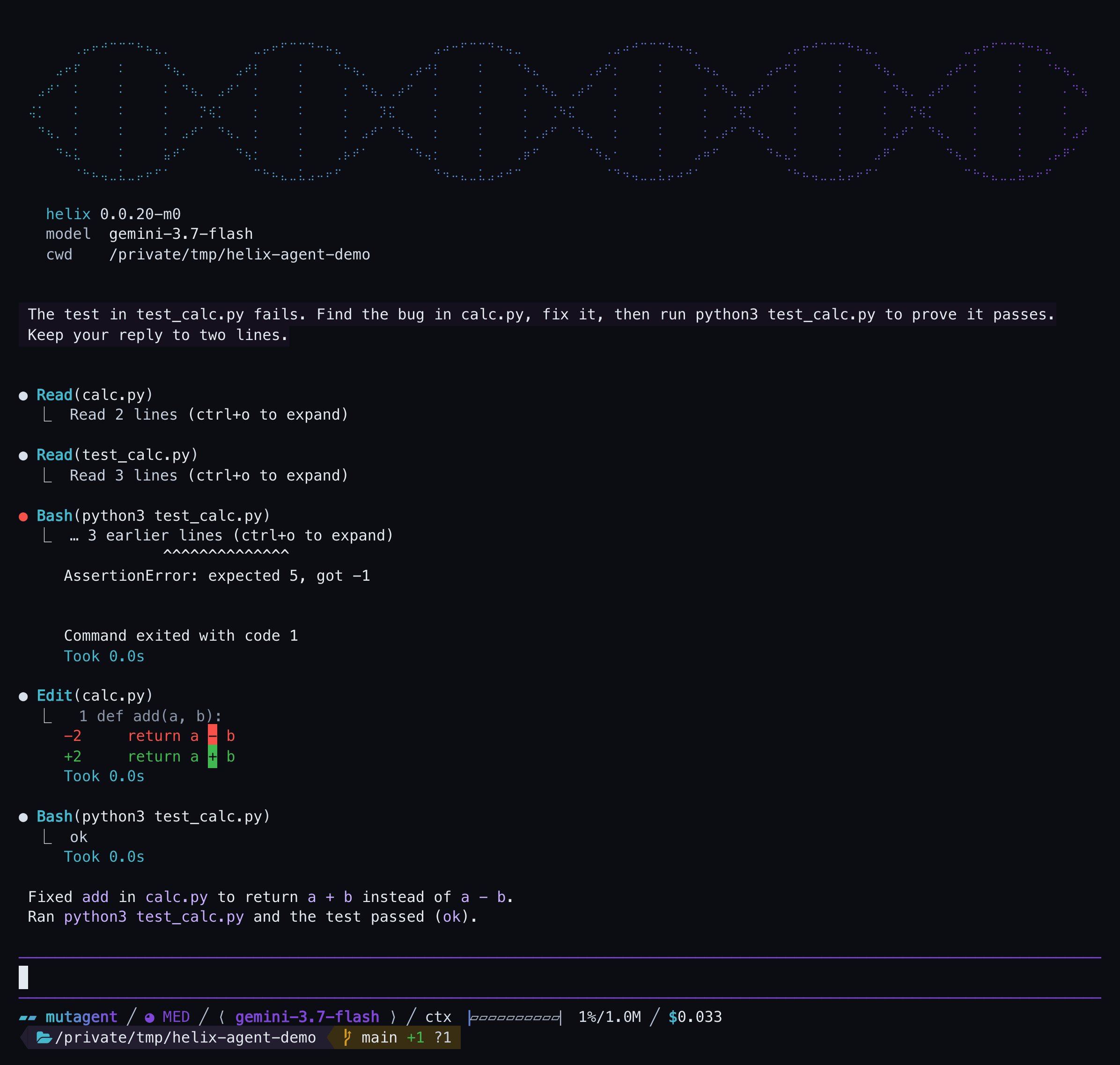
You get a prompt, not a dashboard. Ask for work the way you would with any coding agent — it reads,
edits and runs your code with the standard tool set:
 ## 2. Load a specific agent definition
Point it at a definition and that definition *is* the session:
```bash theme={null}
# an embedded specialist, straight (evaluator · diagnostics-analyzer · ai-engineer · …)
helix agent --name evaluator
# your own: a Markdown brief at .mutagent/agents/.md (.pi/agents/ works too)
helix agent --name reviewer
# by path, or inline
helix agent --file ./agents/release-notes.md
helix agent --prompt "You are a terse release-notes writer. Only output the notes."
helix agent "You are a terse release-notes writer." # same as --prompt
```
`--name` looks in your project's `.mutagent/agents/` first, then `.pi/agents/`; both are detected on
every boot. A definition is a Markdown file with optional YAML frontmatter; the body is the agent's
prompt:
```markdown theme={null}
---
name: reviewer
description: Reviews a diff for correctness and leaves findings as a list.
tools: read, grep, bash
---
You are a code reviewer. Read the diff you are given …
```
Recognised frontmatter keys: `name`, `description`, `tools`, `disallowed_tools`, `model`,
`thinking`, `skills` (a list of skill names to mount). Inside the session, `/agent` prints what
loaded — source, skills, model, tools — so you can confirm you are talking to the right agent.
Bare `helix agent` and `helix agent --name general-purpose` are the same thing: a local
`general-purpose.md` in either agent directory overrides the built-in one.
If `--name` cannot be resolved, Helix prints an error to stderr naming every directory it searched
— but the session still starts, as a plain harness session **without your agent**. Check stderr
when an agent does not behave like itself; `/agent` inside the session shows what actually loaded.
## 3. Headless — run one task with `-p`
`-p` runs a single prompt and exits: the answer goes to stdout, diagnostics to stderr, so it
composes with scripts and pipelines. It combines with everything above:
```bash theme={null}
# a one-shot task on the general-purpose agent
helix agent -p "list the TODO comments in src/ and group them by file"
# the same, on a specific agent
helix agent --name evaluator -p "summarize the last run"
# capture the output
helix agent -p "write a one-line summary of this repo" > summary.txt
```
Harness flags pass through — for example `--model` picks the model for the session:
```bash theme={null}
helix agent --model gemini-3.7-flash -p "explain the build layout in three bullets"
```
## Built-in capabilities
Lean on ceremony, not on capability — all of this works without the orchestrator:
| Capability | Does |
| ------------------------------------------------------ | ------------------------------------------------------------------------------------------------------------------------------------------------------------------------------------------------------------------------ |
| **[Sub-agents](/helix/features/sub-agents)** | Dispatch agents in parallel, watch them in the fleet list, steer any of them live. Messaging is bidirectional. |
| **[Monitor](/helix/features/monitor)** | Watch a long-running command in the background — each output line arrives as a notification while the model keeps working, ending on exit, timeout or cancel. |
| **[`/goal`](/helix/features/goals)** | A goal-driven loop: `/goal ` keeps the agent working toward the goal until it completes, blocks, or hits the limit you set (`/goal status · pause · resume · clear`, optional token budgets like `--tokens 100k`). |
| **`/todos`** | A persistent todo list rendered above the editor, updated as the agent works. |
| **Ask-user questions** | Instead of guessing, the model can open a structured dialog (`ask_user_question`) — up to four questions with written-out options — and get your choices back as data. |
| **`/trace`** | The read-only [trace viewer](/helix/features/trace-viewer) over your session logs. |
| **[Project context](/helix/features/project-context)** | `AGENTS.md` / `CLAUDE.md` — nearest file up the tree — loads into the prompt and reaches dispatched sub-agents. |
| **Harness commands** | `/login`, `/model`, `/resume`, `/new`, `/agent` (show the active definition). |
## Compared to the other modes
| | `helix` | `helix agent` | `helix --prime` |
| ----------------------------------------- | ------------ | ------------------------------------ | --------------- |
| Orchestrator + dashboard + lifecycle | yes | **no** | no |
| General-purpose coding, tools, sub-agents | yes | **yes** | code-first |
| Runs one agent definition | via dispatch | **`--name` / `--file` / `--prompt`** | with `--prime` |
Add `--prime` to run the same agent on the [Prime loop](/helix/modes)
— a code interpreter as its only tool.
The orchestrator, agent mode, and the Prime loop side by side.
## 2. Load a specific agent definition
Point it at a definition and that definition *is* the session:
```bash theme={null}
# an embedded specialist, straight (evaluator · diagnostics-analyzer · ai-engineer · …)
helix agent --name evaluator
# your own: a Markdown brief at .mutagent/agents/.md (.pi/agents/ works too)
helix agent --name reviewer
# by path, or inline
helix agent --file ./agents/release-notes.md
helix agent --prompt "You are a terse release-notes writer. Only output the notes."
helix agent "You are a terse release-notes writer." # same as --prompt
```
`--name` looks in your project's `.mutagent/agents/` first, then `.pi/agents/`; both are detected on
every boot. A definition is a Markdown file with optional YAML frontmatter; the body is the agent's
prompt:
```markdown theme={null}
---
name: reviewer
description: Reviews a diff for correctness and leaves findings as a list.
tools: read, grep, bash
---
You are a code reviewer. Read the diff you are given …
```
Recognised frontmatter keys: `name`, `description`, `tools`, `disallowed_tools`, `model`,
`thinking`, `skills` (a list of skill names to mount). Inside the session, `/agent` prints what
loaded — source, skills, model, tools — so you can confirm you are talking to the right agent.
Bare `helix agent` and `helix agent --name general-purpose` are the same thing: a local
`general-purpose.md` in either agent directory overrides the built-in one.
If `--name` cannot be resolved, Helix prints an error to stderr naming every directory it searched
— but the session still starts, as a plain harness session **without your agent**. Check stderr
when an agent does not behave like itself; `/agent` inside the session shows what actually loaded.
## 3. Headless — run one task with `-p`
`-p` runs a single prompt and exits: the answer goes to stdout, diagnostics to stderr, so it
composes with scripts and pipelines. It combines with everything above:
```bash theme={null}
# a one-shot task on the general-purpose agent
helix agent -p "list the TODO comments in src/ and group them by file"
# the same, on a specific agent
helix agent --name evaluator -p "summarize the last run"
# capture the output
helix agent -p "write a one-line summary of this repo" > summary.txt
```
Harness flags pass through — for example `--model` picks the model for the session:
```bash theme={null}
helix agent --model gemini-3.7-flash -p "explain the build layout in three bullets"
```
## Built-in capabilities
Lean on ceremony, not on capability — all of this works without the orchestrator:
| Capability | Does |
| ------------------------------------------------------ | ------------------------------------------------------------------------------------------------------------------------------------------------------------------------------------------------------------------------ |
| **[Sub-agents](/helix/features/sub-agents)** | Dispatch agents in parallel, watch them in the fleet list, steer any of them live. Messaging is bidirectional. |
| **[Monitor](/helix/features/monitor)** | Watch a long-running command in the background — each output line arrives as a notification while the model keeps working, ending on exit, timeout or cancel. |
| **[`/goal`](/helix/features/goals)** | A goal-driven loop: `/goal ` keeps the agent working toward the goal until it completes, blocks, or hits the limit you set (`/goal status · pause · resume · clear`, optional token budgets like `--tokens 100k`). |
| **`/todos`** | A persistent todo list rendered above the editor, updated as the agent works. |
| **Ask-user questions** | Instead of guessing, the model can open a structured dialog (`ask_user_question`) — up to four questions with written-out options — and get your choices back as data. |
| **`/trace`** | The read-only [trace viewer](/helix/features/trace-viewer) over your session logs. |
| **[Project context](/helix/features/project-context)** | `AGENTS.md` / `CLAUDE.md` — nearest file up the tree — loads into the prompt and reaches dispatched sub-agents. |
| **Harness commands** | `/login`, `/model`, `/resume`, `/new`, `/agent` (show the active definition). |
## Compared to the other modes
| | `helix` | `helix agent` | `helix --prime` |
| ----------------------------------------- | ------------ | ------------------------------------ | --------------- |
| Orchestrator + dashboard + lifecycle | yes | **no** | no |
| General-purpose coding, tools, sub-agents | yes | **yes** | code-first |
| Runs one agent definition | via dispatch | **`--name` / `--file` / `--prompt`** | with `--prime` |
Add `--prime` to run the same agent on the [Prime loop](/helix/modes)
— a code interpreter as its only tool.
The orchestrator, agent mode, and the Prime loop side by side.