> ## Documentation Index
> Fetch the complete documentation index at: https://docs.mutagent.io/llms.txt
> Use this file to discover all available pages before exploring further.
# Sub-agents
> Dispatch a crew in parallel, watch every agent live in the fleet list, and steer any of them by typing at it.
Helix delegates parallel work to sub-agents: the model calls the `Agent` tool, the agent runs in
the background, and the session keeps going. The messaging is bidirectional — the session can steer
a running agent and read its result, and agents send findings back. You watch and steer all of it
from two surfaces: the fleet list and the agent viewer.
In the orchestrator, Helix dispatches the crew itself when a stage needs parallel work. In
[agent mode](/helix/agent-mode), your agent has the same tools and you can ask for parallel work
directly.
## The fleet list
Dispatched agents appear under your prompt:
```
↑↓ select · 1-9 open · enter view · x remove · esc back
⏺ 1 ✓ explore MC Evaluator trace verse 18s · ↓ 72.3k tokens
◯ 3 ⠸ general-purpose MC Builder scaffold — running command… ↻1 · 11s
◯ 5 ⏳ ai-architect queued
+ 2 more
```
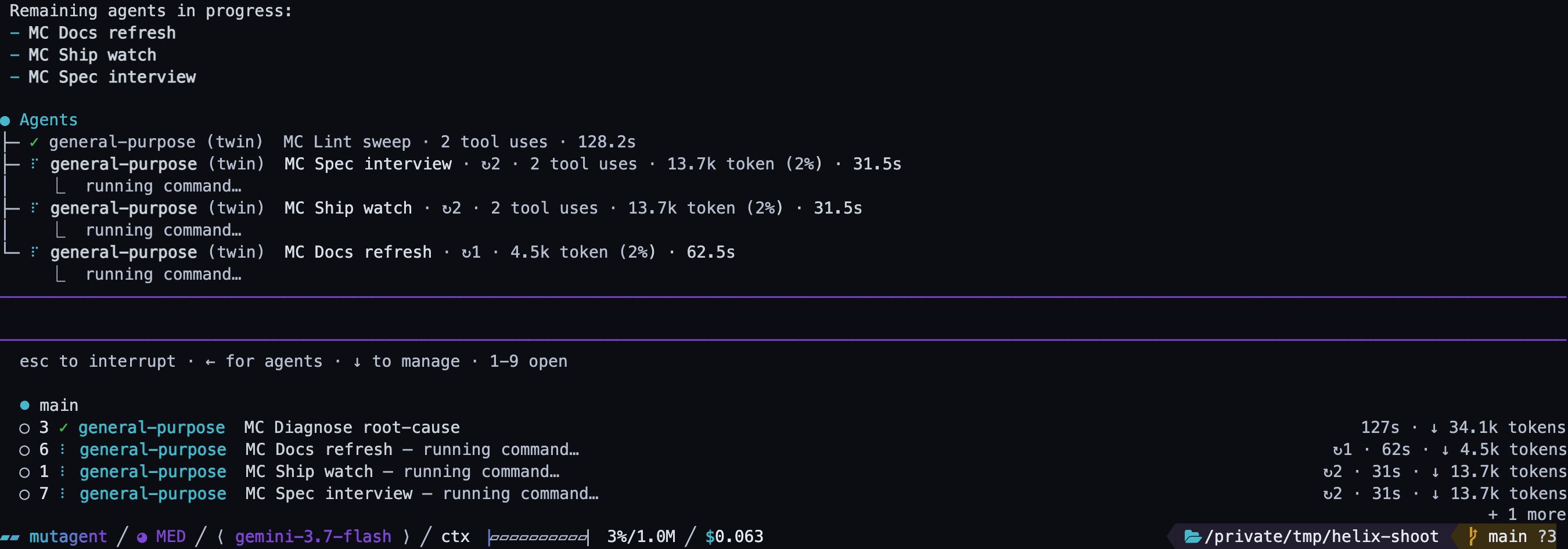 Each row carries the agent's name, its dispatch, and live stats. The list shows at most four rows;
the rest are counted as `+ N more`, never dropped. The digits are **slots held for an agent's
lifetime** — an agent that finishes and ages out never renumbers the ones below it, so `5` opens
what it opened a minute ago.
| Key | Does |
| ------------------------ | ---------------------------------------------------------------------------------------------------- |
| `↓` (at an empty prompt) | Activate the list; `↑`/`↓` move, `Enter` opens, `Esc` returns to the prompt. |
| `1`–`9` | Open that slot directly, at any time. |
| `x` | Remove the selected row. Display only — a running agent keeps running and still delivers its result. |
Finished agents linger for a minute, and the clock restarts each time you open or close one, so an
agent you keep returning to cannot vanish mid-read. The list steps aside while a picker such as
`/model` holds focus.
## The agent viewer
Open an agent and its conversation **replaces** the chat — it is not a split pane. The transcript
renders with the same components as the main session: tool calls are real cards, markdown renders,
diffs render, errors are styled as errors. It updates live while the agent works.
Each row carries the agent's name, its dispatch, and live stats. The list shows at most four rows;
the rest are counted as `+ N more`, never dropped. The digits are **slots held for an agent's
lifetime** — an agent that finishes and ages out never renumbers the ones below it, so `5` opens
what it opened a minute ago.
| Key | Does |
| ------------------------ | ---------------------------------------------------------------------------------------------------- |
| `↓` (at an empty prompt) | Activate the list; `↑`/`↓` move, `Enter` opens, `Esc` returns to the prompt. |
| `1`–`9` | Open that slot directly, at any time. |
| `x` | Remove the selected row. Display only — a running agent keeps running and still delivers its result. |
Finished agents linger for a minute, and the clock restarts each time you open or close one, so an
agent you keep returning to cannot vanish mid-read. The list steps aside while a picker such as
`/model` holds focus.
## The agent viewer
Open an agent and its conversation **replaces** the chat — it is not a split pane. The transcript
renders with the same components as the main session: tool calls are real cards, markdown renders,
diffs render, errors are styled as errors. It updates live while the agent works.
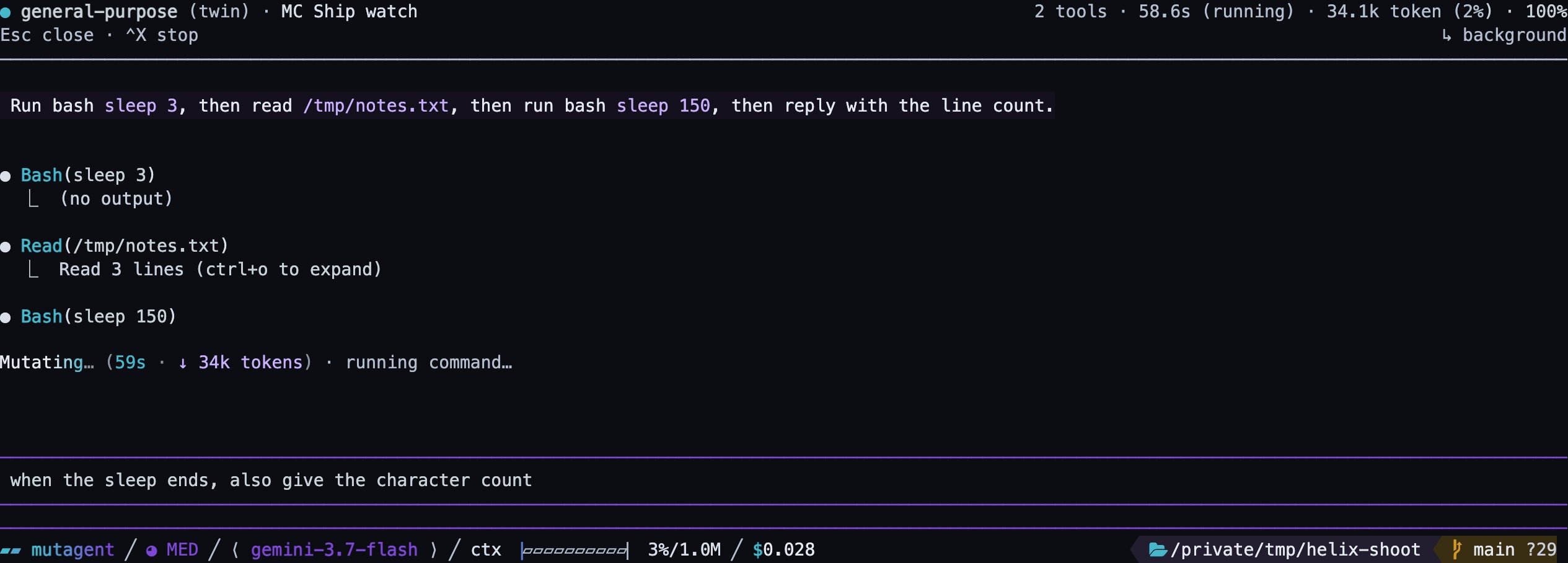 The composer at the bottom is the same editor as the main chat, and **whatever you type steers the
agent you are watching**. A steer that cannot land keeps your text in the box and tells you why —
an agent that has already finished cannot be steered. `Esc` closes the viewer and returns you to
the main conversation; the agent keeps running.
## Failures report as failures
An agent that never reached the model — no tokens, no tools, no output — is reported as an error
with the reason (model availability, provider credential, rate limits), not as a finished agent
with an empty transcript.
The dashboard, the session commands, and the working line.
The composer at the bottom is the same editor as the main chat, and **whatever you type steers the
agent you are watching**. A steer that cannot land keeps your text in the box and tells you why —
an agent that has already finished cannot be steered. `Esc` closes the viewer and returns you to
the main conversation; the agent keeps running.
## Failures report as failures
An agent that never reached the model — no tokens, no tools, no output — is reported as an error
with the reason (model availability, provider credential, rate limits), not as a finished agent
with an empty transcript.
The dashboard, the session commands, and the working line.