

helix. How you start it decides what kind of session you get. All three
modes read your project’s AGENTS.md / CLAUDE.md, use the provider you signed in with, and share
the session tools — /trace, the sub-agent views, and the rest (see Sessions).
Before you start: install Helix and give it a provider (an exported key
such as ANTHROPIC_API_KEY, or /login inside Helix). Running Helix on your machine needs no
Mutagent sign-in; only /cloud does.
These commands run on your machine.
mutagent helix, mutagent helix agent, and
mutagent helix --prime run the same three modes in a cloud sandbox. See
Helix in the cloud.helix: the full Helix session
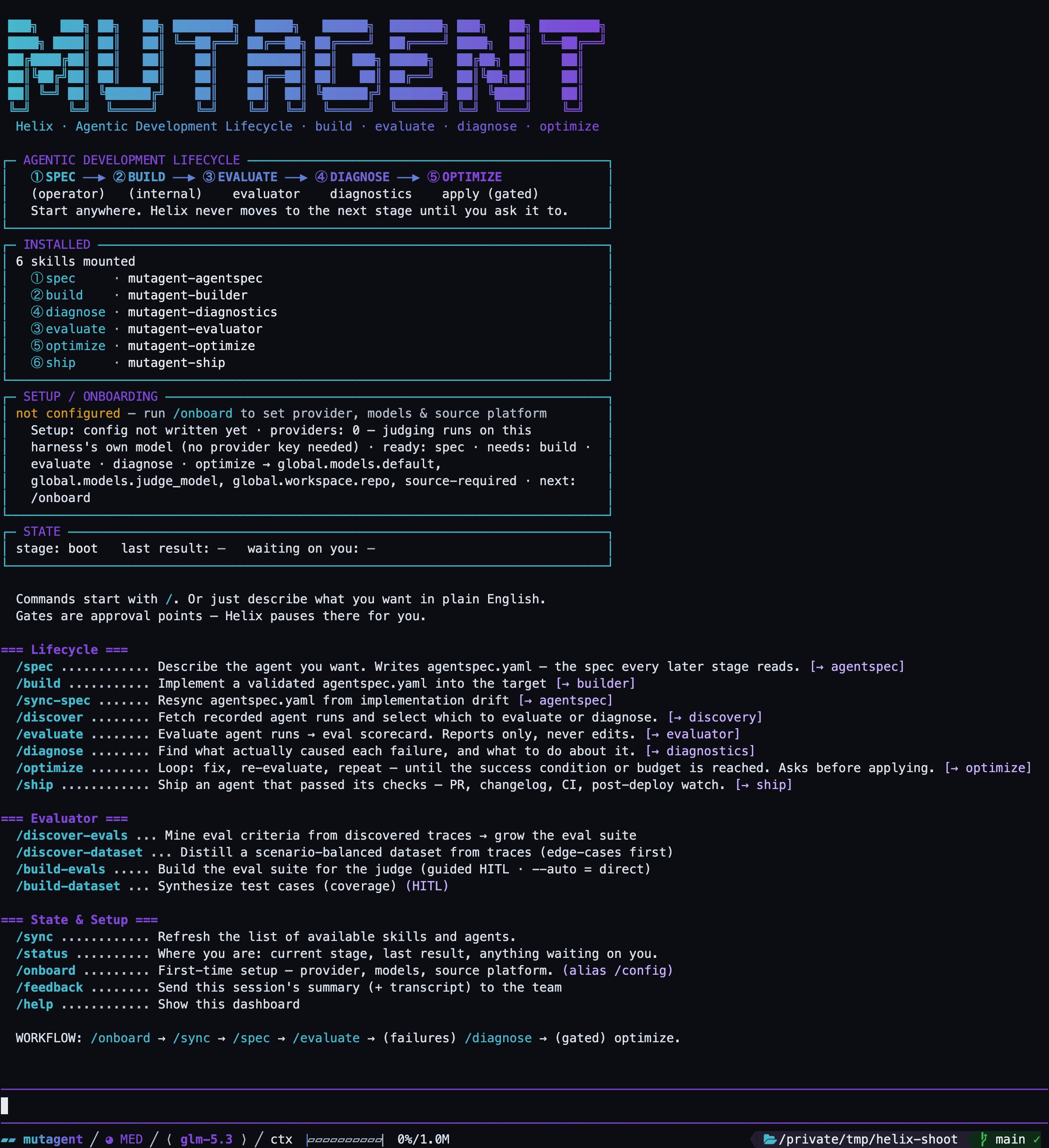
The dashboard helix boots into.
/command — both reach the same stage:
/help repaints the dashboard at any time;
/clear starts a fresh conversation without leaving.
This is the only mode with the five stage commands (
/spec, /build, /evaluate …). The other
modes leave them out on purpose.helix agent: a single agent as the session
/goal, /trace and your project context all still work. Definitions resolve
by --name (searched in .mutagent/agents/, .pi/agents/ and .claude/agents/; .mutagent/agents/
wins on a name clash; see Agent mode for the full list), --file, --prompt, or
a bare quoted prompt.
Agent mode in full
Interactive, loading a specific definition, headless with
-p — plus the capability list and the
sub-agent views, with real captures.helix --prime: the code-first mode
helix: the Helix persona, the start screen, the stage commands, and the
tool for starting sub-agents. What is there instead: one tool, run, that runs code. Anything a
program defines (variables, functions) is still there for the next program in the same session, so
the model builds on earlier work instead of redoing it.
Each program, or cell, runs in a sandbox. A cell reaches your machine only through the functions
Prime gives it:
- Files and shell. File reads, writes and shell commands from a cell go through the same tool pipeline as any other tool call, so permissions and plan mode apply to them too. Shell output comes back with its exit code. It is capped at 1 MiB; past that, the full output is saved to a file.
- Your MCP tools. A cell can search the MCP servers you configured, read a tool’s parameters and call it.
Combine it with agent mode to run one of your agents in the code-first mode: same agent, with
running code as its only tool:
Prime is experimental.
Headless: helix -p
Every mode can run headless with -p: you pass one prompt, Helix prints the answer and exits,
with no interactive screen. Use it from scripts, CI, or another coding agent. The stage commands work
headless too.
Output (first command)
ANTHROPIC_API_KEY) or
pass --provider and --model. Without one it exits with “No API key found for
<provider>.”
The answer goes to stdout and diagnostics go to stderr. For a stream of events instead of the final
text, add --mode json. When stdin or stdout is not a terminal, Helix trusts the project’s local
files in its .pi/ folder (such as project settings and extensions) for the run without asking, as
--approve does; pass --no-approve to ignore them.
Move a session to a cloud sandbox
Early access. Cloud sandboxes are not open to every account yet: we are letting accounts in
gradually while we test. If yours isn’t enabled yet,
/cloud says so and nothing is started./cloud sends your next turns to a cloud sandbox while you keep the
local session on screen. The sandbox starts with an empty conversation and runs your workspace’s
default model (or the model you name with /cloud on --model provider/model), at your local
thinking level. With neither, it picks the first model your workspace offers and says so in one
line. The footer shows the model the sandbox runs as ☁:provider/model, /model lists it with a
☁, and /cloud model provider/model changes it. /cloud never changes your saved default model.
It needs mutagent login on this machine (see Sign in) and a workspace with an
LLM provider (see LLM providers and models).
Switching back or quitting Helix leaves the sandbox running; it shuts itself down 15 minutes after
its last turn, and the next
/cloud picks it up again. To start a cloud session
from your terminal instead, see Helix in the cloud.
The three modes side by side
Next: sessions
What the dashboard shows, the slash commands, the fleet view and the agent viewer.